Dashboard
Paid content
Paid Content lets you share one or more file links behind a payment flow. A recipient opens the payment URL, completes the configured payment, and receives the Content links after the Content status becomes paid.
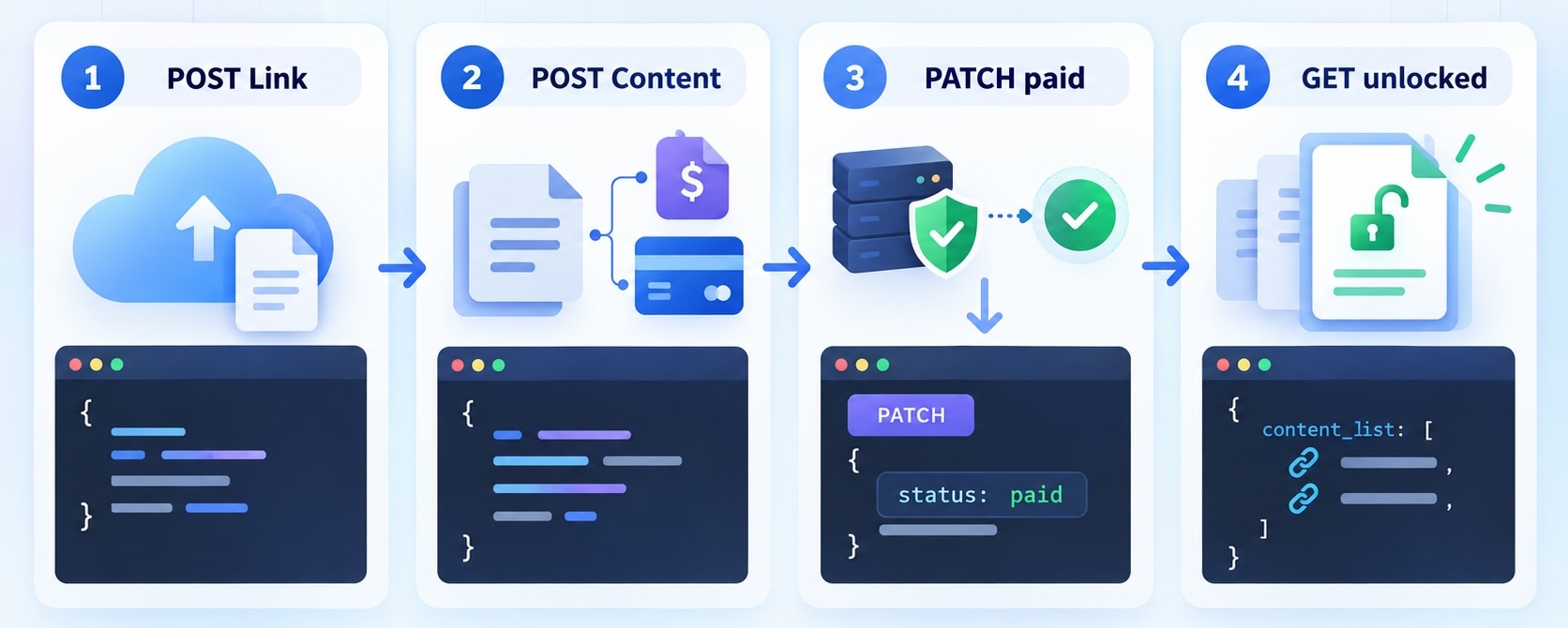
You can manage Paid Content from the Dashboard or use the API for the complete workflow:
- Create Content links for files hosted by you.
- Create Content and attach the Content link IDs.
- Share the payment URL returned in the
linkfield. - Let the recipient pay through Stripe, your payment iframe, or your custom payment flow.
- For a Custom or IFrame payment, verify the payment on your backend and use
PATCHto set the Content status topaid.
Create a Content link
A Content link is a public URL to a file hosted in your own bucket, CDN, or application. Our platform stores and uses only the destination file URL.
POST https://a.loopmessage.com/api/v1/paid-content/link/
Headers
| Name | Type | Description |
|---|---|---|
| Authorization* | String | API key for the organization. |
| Content-Type* | String | application/json |
Request body
| Name | Type | Description |
|---|---|---|
| link* | String | Publicly accessible URL of the file. Required. |
| name | String | Internal name for the link. |
| display_name | String | Name shown to the recipient after payment. |
Request body example
{
  "link": "https://cdn.example.com/files/course-guide.pdf",
  "name": "course-guide",
  "display_name": "Course guide"
}
Response
{
  "id": "content-link-id",
  "link": "https://cdn.example.com/files/course-guide.pdf",
  "name": "course-guide",
  "display_name": "Course guide",
  "create_date": "2026-09-19T12:00:00+00:00"
}
The response id is the Content link ID. Save it for the links_ids array when creating Content.
List Content links
GET https://a.loopmessage.com/api/v1/paid-content/links-list/
Headers
| Name | Type | Description |
|---|---|---|
| Authorization* | String | API key for the organization. |
| Content-Type* | String | application/json |
Response
{
  "links": [
    {
      "id": "content-link-id",
      "link": "https://cdn.example.com/files/course-guide.pdf",
      "name": "course-guide",
      "display_name": "Course guide"
    }
  ]
}
Create Content
POST https://a.loopmessage.com/api/v1/paid-content/details/
Common fields
| Name | Type | Description |
|---|---|---|
| name | String | Name of the Content item. |
| links_ids* | Array | Content link IDs to reveal after payment. Required. These are the id values returned by the Content link endpoints. |
| amount* | Integer | Positive amount in cents. Required. For example, 999 represents 9.99 in the selected currency. |
| currency* | String | Three-letter currency code, for example USD. Required. |
| expire_date | String | Optional ISO 8601 expiration date. |
| support_link | String | Optional support URL shown to the recipient. |
Choose exactly one payment method for each Content item. The fields name, links_ids, amount, currency, expire_date, and support_link are common fields. The payment-specific fields depend on method.
The amount must be an integer. The last two digits represent cents: 999 means 9.99, 500 means 5.00, and 100 means 1.00 in the selected currency. Do not send decimal values such as 9.99. For Stripe payments, the minimum amount is 50 (for example, 50 means 0.50). Amounts below 50 are rejected.
Stripe
Use method: "stripe" when our platform should create and verify the Stripe PaymentIntent.
Headers
| Name | Type | Description |
|---|---|---|
| Authorization* | String | API key for the organization. |
| Content-Type* | String | application/json |
Request body
| Name | Type | Description |
|---|---|---|
| stripe_secret_api_key* | String | Stripe secret key. Required for Stripe. Keep it on your backend. |
| stripe_public_api_key* | String | Stripe publishable key. Required for Stripe. |
| stripe_payment_methods | Array | card, crypto, or both. Defaults: [“card”]. |
| three_d_secure | Boolean | When true, request a 3D Secure challenge for card payments. |
Request body example
{
  "name": "Premium course guide",
  "links_ids": ["content-link-id"],
  "method": "stripe",
  "amount": 999,
  "currency": "USD",
  "expire_date": "2026-12-31T23:59:59Z",
  "support_link": "https://example.com/support",
  "stripe_secret_api_key": "sk_test_...",
  "stripe_public_api_key": "pk_test_...",
  "stripe_payment_methods": ["card"],
  "three_d_secure": true
}
Do not include payment_iframe_url or payment_script in a Stripe request.
Create a restricted Stripe Secret Key
As a security best practice, create a separate restricted Secret Key for our platform instead of sharing your standard full-access Secret Key.
In the Stripe Dashboard:
- Open Developers → API keys.
- Start creating a new Secret Key and select Providing this key to a third-party application.
- Select Customize permissions for this key.
- Grant the minimum permission required by Paid Content.
| Stripe resource | Permission |
|---|---|
| Payment Intents | Write |
Our backend uses this permission to create PaymentIntents for new Content and to list and retrieve PaymentIntents while checking their status. No permissions for Customers, Charges, Refunds, Payment Methods, Checkout Sessions, Payouts, or Webhooks are required by this flow.
Copy the restricted key and provide it as stripe_secret_api_key. Keep it on your backend and do not expose it in browser code. Use a separate restricted key for test mode and live mode.
The publishable key is provided separately as stripe_public_api_key and can be used by the browser payment UI. See Stripe’s API key documentation for key management guidance.
IFrame
Use method: "iframe" when your own payment page should be displayed in the payment flow.
Headers
| Name | Type | Description |
|---|---|---|
| Authorization* | String | API key for the organization. |
| Content-Type* | String | application/json |
Request body
| Name | Type | Description |
|---|---|---|
| payment_iframe_url | String | URL of your payment page. |
Request body example
{
  "name": "Premium report",
  "links_ids": ["content-link-id"],
  "method": "iframe",
  "amount": 1000,
  "currency": "USD",
  "expire_date": "2026-12-31T23:59:59Z",
  "support_link": "https://example.com/support",
  "payment_iframe_url": "https://payments.example.com/checkout/report-123"
}
Once your payment processor confirms the transaction, use PATCH to set the Content status to paid.
Custom
Use method: "custom" when you provide your own payment logic.
Headers
| Name | Type | Description |
|---|---|---|
| Authorization* | String | API key for the organization. |
| Content-Type* | String | application/json |
Request body
| Name | Type | Description |
|---|---|---|
| payment_script | String | Your custom payment script or integration data. |
Request body example
{
  "name": "Premium consultation recording",
  "links_ids": ["content-link-id", "second-content-link-id"],
  "method": "custom",
  "amount": 2500,
  "currency": "USD",
  "expire_date": "2026-12-31T23:59:59Z",
  "support_link": "https://example.com/support",
  "payment_script": "https://payments.example.com/custom/consultation-123"
}
Confirm the payment on your backend, then use PATCH to set the Content status to paid.
Response
{
  "id": "paid-content-id",
  "name": "Premium course guide",
  "payment_iframe_url": "",
  "support_link": "https://example.com/support",
  "amount": 999,
  "currency": "USD",
  "method": "stripe",
  "link": "https://pay.imsg.link/abcdefghijkl",
  "status": "pending",
  "create_date": "2026-09-19T12:00:00+00:00",
  "content_list": [
    {
      "id": "content-link-id",
      "name": "course-guide",
      "display_name": "Course guide",
      "link": "https://cdn.example.com/files/course-guide.pdf"
    }
  ],
  "stripe_payment_methods": ["card"],
  "three_d_secure": true,
  "expire_date": "2026-12-31T23:59:59+00:00"
}
The link field contains the URL to share with the destination customer.
List Content
GET https://a.loopmessage.com/api/v1/paid-content/list/
Headers
| Name | Type | Description |
|---|---|---|
| Authorization* | String | API key for the organization. |
| Content-Type* | String | application/json |
Query parameters
| Name | Type | Description |
|---|---|---|
| page | Integer | Optional. Page number. Defaults to 1. |
| per_page | Integer | Optional. Number of items per page. Defaults to 20; maximum is 5000. |
| search | String | Optional. Filters Content by name. |
Response
{
  "page": 1,
  "num_pages": 2,
  "per_page": 20,
  "count": 21,
  "items": [
    {
      "id": "paid-content-id",
      "name": "Premium course guide",
      "payment_iframe_url": "",
      "support_link": "https://example.com/support",
      "amount": 999,
      "currency": "USD",
      "method": "stripe",
      "link": "https://pay.imsg.link/abcdefghijkl",
      "status": "pending",
      "create_date": "2026-09-19T12:00:00+00:00",
      "content_list": [
        {
          "id": "content-link-id",
          "name": "course-guide",
          "display_name": "Course guide",
          "link": "https://cdn.example.com/files/course-guide.pdf"
        }
      ],
      "stripe_payment_methods": ["card"],
      "three_d_secure": true,
      "expire_date": "2026-12-31T23:59:59+00:00"
    }
  ]
}
The top-level items[].id is the Content ID. Each items[].content_list[].id is a Content link ID.
Get Content details
GET https://a.loopmessage.com/api/v1/paid-content/details/{content_id}/
Headers
| Name | Type | Description |
|---|---|---|
| Authorization* | String | API key for the organization. |
| Content-Type* | String | application/json |
Path parameters
| Name | Type | Description |
|---|---|---|
| content_id* | String | Content ID returned in the response id field. |
Response
{
  "id": "paid-content-id",
  "name": "Premium course guide",
  "payment_iframe_url": "",
  "support_link": "https://example.com/support",
  "amount": 999,
  "currency": "USD",
  "method": "stripe",
  "link": "https://pay.imsg.link/abcdefghijkl",
  "status": "pending",
  "create_date": "2026-09-19T12:00:00+00:00",
  "content_list": [
    {
      "id": "content-link-id",
      "name": "course-guide",
      "display_name": "Course guide",
      "link": "https://cdn.example.com/files/course-guide.pdf"
    }
  ],
  "stripe_payment_methods": ["card"],
  "three_d_secure": true,
  "expire_date": "2026-12-31T23:59:59+00:00"
}
The top-level id is the Content ID. The content_list[].id value is the Content link ID.
Update Content
You can update the Content name, support link, expiration date, and status.
PATCH https://a.loopmessage.com/api/v1/paid-content/details/{content_id}/
Headers
| Name | Type | Description |
|---|---|---|
| Authorization* | String | API key for the organization. |
| Content-Type* | String | application/json |
Path parameters
| Name | Type | Description |
|---|---|---|
| content_id* | String | Content ID returned in the response id field. Required. |
Request body
Send only the fields that you want to change.
| Name | Type | Description |
|---|---|---|
| name | String | New Content name. |
| support_link | String | New support URL. |
| expire_date | String | New ISO 8601 expiration date. Send an empty value to remove it. |
| status | String | New status. See Content statuses. |
To mark Custom or IFrame content as paid/unlocked, verify the payment on your backend and use this PATCH request with status: "paid":
PATCH /api/v1/paid-content/details/{content_id}/
Authorization: YOUR_API_KEY
Content-Type: application/json

{
  "status": "paid"
}
This PATCH request is required to unlock the Content for Custom and IFrame payment methods. Do not mark content as paid based only on a browser redirect or a client-side success message.
Example of updating the name and expiration date:
{
  "name": "Updated premium report",
  "expire_date": "2027-01-31T23:59:59Z"
}
Response
The response has the same Content structure as the Create, List, and Details responses. The top-level id is the Content ID, and every content_list[].id is a Content link ID.
{
  "id": "paid-content-id",
  "name": "Updated premium report",
  "payment_iframe_url": "",
  "support_link": "https://example.com/support",
  "amount": 999,
  "currency": "USD",
  "method": "stripe",
  "link": "https://pay.imsg.link/abcdefghijkl",
  "status": "paid",
  "create_date": "2026-09-19T12:00:00+00:00",
  "content_list": [
    {
      "id": "content-link-id",
      "name": "course-guide",
      "display_name": "Course guide",
      "link": "https://cdn.example.com/files/course-guide.pdf"
    }
  ],
  "stripe_payment_methods": ["card"],
  "three_d_secure": true,
  "expire_date": "2027-01-31T23:59:59+00:00"
}
Content statuses
| Status | Meaning |
|---|---|
draft | Content is being prepared and is not ready for normal delivery. |
pending | Content is awaiting payment. The recipient has not unlocked the Content yet. |
paid | Payment is confirmed and the Content links are unlocked. For Custom and IFrame methods, set this status with PATCH after verifying payment server-side. |
expired | The expiration time has passed; the Content is no longer available as an active offer. |
Security notes
- Keep the Stripe secret key and our API key on your backend.
- Never commit secret keys to a repository or expose them in frontend JavaScript.
- Validate the payment server-side before setting the status to
paid. - A Content link points to a file hosted by you. If the file URL is publicly accessible, anyone who obtains that URL may open the file independently of the Paid Content status.