How do SMS/RCS and Call Forwarding work?
SMS-fallback
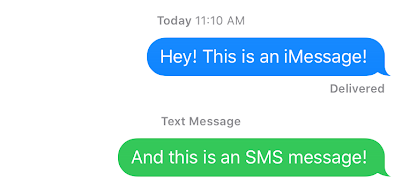
The SMS-fallback feature allows you to process SMS messages and reply via SMS (green bubbles) if your users using Android platforms or have trouble with their internet connection, so messages are delivered as SMS instead of iMessage (a common thing when riding the subway and texting). There is nothing you need to do on your part, we automatically send/receive SMS instead of iMessage.
This feature is purchased separately for your sender name and can be useful when you need your contacts to send a message even if they have internet connection issues.
RCS
Rich Communication Services (RCS) is a modern messaging protocol that upgrades traditional SMS/MMS, offering a feature-rich, internet-based chat experience similar to iMessage or WhatsApp. If recipient device supports RCS it will automatically use this protocol instead of SMS. Unlike SMS, the RCS protocol supports attachments, audio messages, encryption, reactions, typing indicators, and delivered/read statuses. Therefore, this feature will provide an experience similar to iMessage, but for Android users.
Call forwarding
The call forwarding feature will forward all cell calls to the number that you specify. You will receive calls from the phone number of a user who calls your sender’s name. Call forwarding is not supported in FaceTime. However, you can set up receiving webhooks when someone calls you on FaceTime and then call them back using your VoIP service or by replying to the user with an iMessage.
To activate this feature, you need to contact support and specify the phone number to which calls should be forwarded. Within 1-2 business days, the forwarding will be activated.